The UI/UX design process plays an important role in creating user-friendly websites and mobile apps. Have you ever visited a website or used an app that just felt right? Everything was easy to find, the navigation made sense, and completing a task felt effortless. That kind of experience doesn't happen by accident. It comes from thoughtful UI/UX design.
Building a successful digital product takes more than choosing attractive colors or creating beautiful screens. It starts with understanding people, knowing what they need, and finding the right way to solve their problems.
Whether you're planning a new website, developing a mobile app, or improving an existing digital product, having a clear design process can make the entire journey smoother.
So, how does an idea become a fully designed digital experience? Let's walk through the UI/UX design process, step by step.
What Is the UI/UX Design Process?
Think about the last time you used an app that was easy to navigate. You probably didn't have to think twice about where to click or what to do next. That's what good UI/UX design aims to achieve.
The UI/UX design process is the journey of understanding users, organizing information, designing interfaces, and testing how everything works before a product is developed.
It brings together two important elements:
User Experience (UX) Design
UX design focuses on how people interact with a product. It includes navigation, usability, information structure, and the overall journey users take to complete their goals.
User Interface (UI) Design
UI design focuses on how a product looks and feels. It covers visual elements such as colors, typography, buttons, icons, layouts, and interactive components.
Why Is a Structured UI/UX Design Process Important?
Imagine building a house without a proper plan. You might end up changing the layout halfway through or discovering that something important is missing.
Digital product design works in much the same way. Without a clear process, teams can lose time, overlook user needs, and make changes that could have been avoided earlier.
A structured UI/UX design process helps in several ways:
1. Understand What Users Really Need
Research gives designers a clearer picture of users' expectations, everyday challenges, and behavior. This makes it easier to create features that actually solve problems.
2. Make Products Easier to Use
Clear navigation, thoughtful layouts, and simple interactions help people find what they need without feeling confused.
3. Save Time During Development
Wireframes and prototypes allow teams to explore ideas and identify problems before development begins.
4. Maintain a Consistent Design
A shared design system keeps colors, typography, buttons, and components consistent throughout the product.
5. Create Better Business Opportunities
When people enjoy using a product, they're more likely to engage with it, return to it, and recommend it to others.
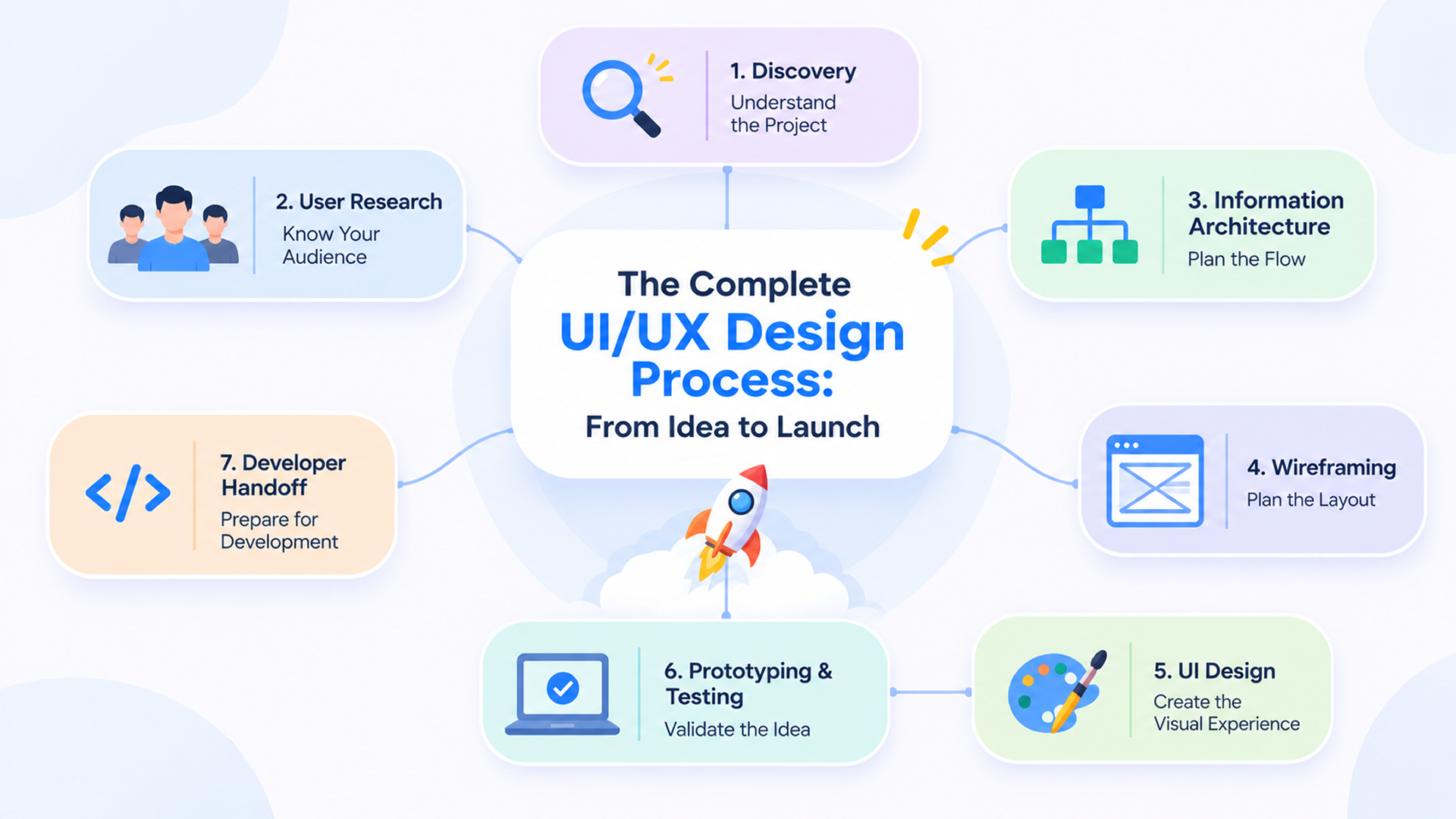
7 Essential Steps in the UI/UX Design Process
Every project is different. A simple landing page may need less planning than a feature-rich SaaS platform, but most digital products follow a similar design journey.
Here are seven essential steps that turn an idea into a user-friendly digital experience.
1. Discovery: Understanding the Project
Before starting the design, it's important to understand the business, its goals, and the problem the product needs to solve.
During this stage, designers:
Understand business goals and project requirements.
Identify the target audience.
Review competitors and existing products.
Define key challenges and priorities.
For example, before designing a fitness app, the team needs to know whether users want workout tracking, activity monitoring, or personalized fitness plans.
2. User Research: Knowing Your Audience
Good design starts with understanding the people who will use the product. Instead of relying on assumptions, designers gather insights directly from potential users.
Common research methods include:
User interviews: Understand users' needs and experiences.
Surveys: Collect feedback from a wider audience.
Competitor analysis: Learn from similar products.
User personas: Create profiles based on research.
Journey mapping: Understand the user's experience.
These insights help designers make better decisions and focus on what users actually need.
3. Information Architecture and User Flow
A product should make it easy for users to find information and complete tasks. Information architecture organizes content and features, while user flows show the steps users take to reach a goal.
For example, an e-commerce checkout flow might include browsing products, adding items to the cart, entering delivery details, and completing payment.
Planning these steps helps create a smooth and straightforward experience.
4. Wireframing: Planning the Layout
Wireframes are simple layouts that show how each screen will be structured before visual design begins.
Designers use them to plan:
Screen layouts and content placement.
Navigation and menus.
Buttons and important actions.
Information hierarchy.
For example, a dashboard wireframe helps decide where to place charts, analytics cards, filters, and navigation. It also makes early changes easier and saves time later.
5. UI Design: Creating the Visual Experience
Once the structure is ready, designers bring the product to life with colors, typography, icons, images, and other visual elements.
This stage focuses on creating an attractive and consistent interface through:
Colors and typography.
Buttons, forms, and icons.
Spacing and alignment.
Visual hierarchy.
Responsive layouts and reusable components.
The goal isn't just to make the product look good, but to make it easy and enjoyable to use.
6. Prototyping and Usability Testing
Before development, designers create interactive prototypes to show how the product will work.
Testing these prototypes with real users helps identify confusing navigation, unclear actions, and areas that need improvement.
Based on user feedback, designers refine the experience to make it more intuitive and effective.
7. Developer Handoff: Preparing for Development
Once the designs are finalized, they're shared with developers along with the details needed to build the product accurately.
A typical handoff includes:
Final UI screens and reusable components.
Colors, typography, and spacing details.
Interaction and animation guidelines.
Responsive layouts and design assets.
Clear communication between designers and developers helps ensure the final product matches the intended design. A final review also helps catch visual differences and usability issues before launch.
Questions and answers
What is the difference between UI and UX design?
UX design focuses on the overall user experience, including usability, navigation, user journeys, and interactions. UI design focuses on the visual appearance of the product, including colors, typography, buttons, icons, and layouts. Both work together to create effective digital products.
Which comes first, UI or UX design?
UX design generally comes first because designers need to understand users, plan navigation, and establish the product structure before creating the final visual interface. However, UI and UX designers often collaborate throughout the project.
Why is user research important in UI/UX design?
User research helps designers understand users' actual needs, behaviors, expectations, and challenges. It reduces assumptions, supports better design decisions, and helps create products that solve real problems.
How long does the UI/UX design process take?
The timeline depends on the complexity, features, research requirements, and number of screens. A simple website may take a few weeks, while a complex mobile application or SaaS platform may require several months of research, design, testing, and iteration.