


click to get service View profile
In today’s fast-evolving digital landscape, SaaS products power the way modern businesses operate — enabling seamless collaboration, automation, and scalability. However, the true success of any SaaS platform depends on its ability to deliver a smooth and engaging user experience. That’s where SaaS UI/UX Design plays a vital role, ensuring every interaction feels intuitive, efficient, and aligned with user needs.
A well-designed SaaS interface isn’t just about aesthetics — it’s about crafting an experience that simplifies complex workflows, drives user engagement, and delivers value with every click. Whether you’re building a new product or improving an existing one, understanding the core principles of SaaS UI/UX design can help you create interfaces that are intuitive, efficient, and enjoyable to use.
In this guide, we’ll explore how to master these principles, balance usability with scalability, and design SaaS products that keep users coming back — not because they have to, but because they love to.
1. User-centricity
User-centricity is the cornerstone of effective SaaS UI/UX Design. It emphasizes deeply understanding user goals, pain points, and behaviors to create experiences that truly align with their needs. By adopting this approach, your platform becomes more intuitive and valuable—solving real user problems instead of introducing unnecessary complexity.
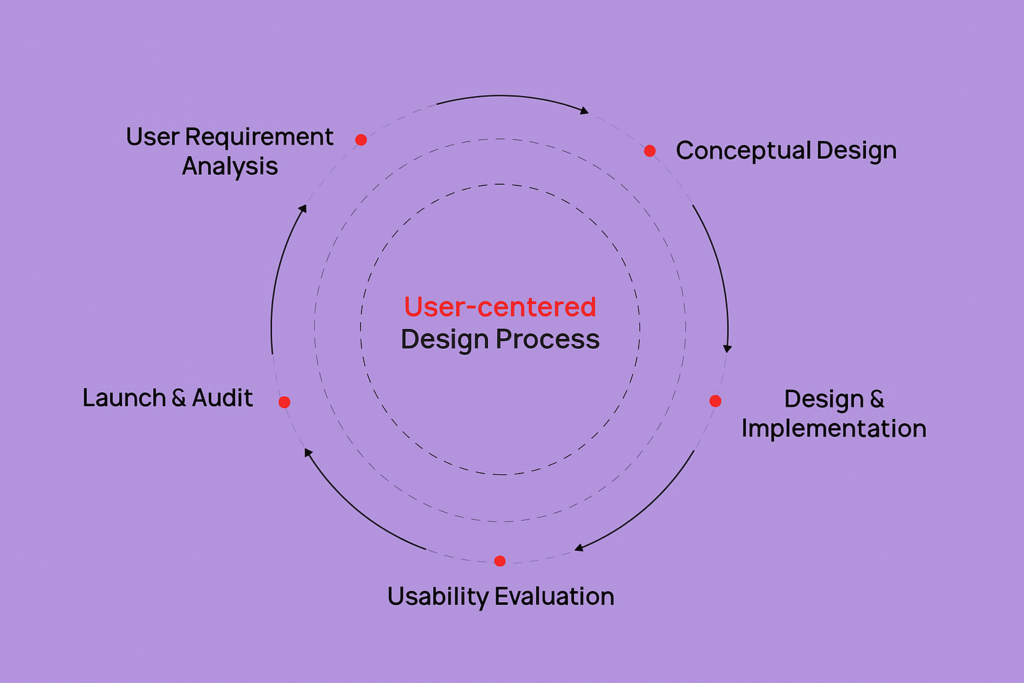
Two essential components of user-centric SaaS UI/UX Design are user empathy and user research. User empathy allows designers to understand the product from the user’s perspective, uncovering emotions, motivations, and frustrations. Meanwhile, user research provides data-driven insights that validate assumptions and inform strategic design choices. Together, they create a foundation for building SaaS experiences that are both intuitive and meaningful, ensuring every interaction truly serves the user’s needs.
To create a User-centered SaaS UX Design:
- Target Audience Focus: In SaaS UI/UX Design, understanding your target audience is essential to creating a meaningful and goal-driven experience. Start by identifying who your users are and the specific problems your SaaS product solves for them. Keep the design and messaging aligned with this core purpose—avoiding clutter, distractions, or unnecessary features. A focused and user-centered approach not only builds trust but also helps users immediately recognize the value your product delivers.
Example: Mailchimp’s homepage focuses solely on marketing automation, making it instantly clear who it’s built for.
- Task-Driven Workflows: Design around the real tasks users need to complete, not just a list of features. Simplify navigation, reduce steps, and make frequent actions effortless. This helps users achieve their goals faster and keeps them engaged with your product long term.
Example: Notion lets users customize their workspace around key tasks, keeping workflows simple and clutter-free.
- Context-Aware Interfaces: In SaaS UI/UX Design, adaptability is key to delivering a personalized and efficient user experience. Tailor the interface based on user roles, experience levels, or current tasks—showing only the most relevant options at the right time. For instance, display admin tools exclusively for administrators or simplified layouts for new users. This approach reduces cognitive load, enhances usability, and makes the product feel more intuitive and responsive to each individual’s needs.
Example: Slack hides advanced workspace settings from regular users, keeping the interface clean and role-specific.
- Lifecycle-Centered Design: Design for every stage of the user journey—from onboarding to mastery to re-engagement. Offer guidance to beginners, shortcuts for experts, and personalized prompts for returning users. This ensures consistent satisfaction and long-term product adoption.
Example: Figma offers step-by-step onboarding for new users, while advanced users get shortcuts and team collaboration tools.
2. Simplicity
Simplicity is one of the most essential SaaS design principles, ensuring that every interaction is clear and free from unnecessary clutter. A simple SaaS interface keeps users focused on achieving their goals without confusion or distraction.
True simplicity in SaaS UI/UX Design goes beyond clean visuals or minimal buttons—it’s about eliminating friction through clear structure and purposeful hierarchy. When users can complete essential actions effortlessly and intuitively, your product delivers a seamless experience that feels both powerful and easy to use.
To create a simple SaaS product design:
- Focus on Core Functions: Identify the key actions your users perform most often and prioritize those features. Remove any clutter or redundant elements that distract from these main tasks to make the product feel clean, fast, and effortless to use.
- Create a Clear Information Hierarchy: Use layout, typography, and color strategically to guide attention and make information easy to scan. Place primary actions and key data where users expect to find them, grouping related items logically to reduce cognitive load.
- Intuitive Navigation: Ensure users can find what they need quickly and without confusion. Use clear menu structures, consistent placement, and logical labeling to keep navigation simple and user-friendly, even in feature-rich SaaS products.
- Progressive Disclosure & Adaptive Onboarding: Avoid overwhelming users with too much information at once. Reveal features gradually and provide contextual guidance as users explore the product, tailoring tips based on user behavior or role to create a smooth learning curve.
3. Consistency
The SaaS design principle of “Consistency” is what builds trust and predictability across your product. It’s about maintaining uniform design elements, interaction patterns, and terminology across every screen and workflow.
When users experience familiar layouts and predictable interactions, they navigate your platform with greater confidence and ease. Consistency in SaaS UI/UX Design not only enhances usability but also reinforces brand identity and user trust, creating a cohesive experience across desktop, tablet, and mobile devices.
To create a consistent SaaS product design:
- Establish a Design System: Define and document your product’s core visual and interactive elements—such as color palette, typography, icons, and tone of voice—to ensure every screen and component feels cohesive and aligned with your brand identity.
- Ensure Visual Harmony: Maintain consistent spacing, alignment, and layout across the product to create a balanced, unified interface. Visual harmony helps users focus on tasks without distraction and builds a sense of familiarity with each interaction.
- Build a Responsive SaaS Platform: Design for cross-device coherence so the experience feels seamless across desktops, tablets, and mobile devices. The goal is not identical screens, but consistent logic, navigation, and flow that preserve user confidence and reduce friction as they switch between devices.
4. Efficiency
Efficiency is a key principle of SaaS UI/UX Design that empowers users to complete tasks quickly and with minimal effort. It focuses on streamlining workflows, minimizing cognitive load, and ensuring every interaction adds value. By designing for efficiency, your SaaS product delivers faster performance, greater usability, and a smoother overall user experience.
By streamlining navigation, automating repetitive tasks, and designing for performance, you create a SaaS experience that drives both productivity and satisfaction.
To create an efficient SaaS UX Design:
- Accelerate Time-to-Value (TTV): Focus on minimizing the time between signup and the user’s first “Aha!” moment — when they clearly see the value of your product. Streamline onboarding, remove unnecessary steps, and guide users visually to core actions that deliver instant results. The faster users find success, the higher your engagement and retention rates.
- Simplify Sign-Up Flow: Reduce friction by asking only for essential information like name and email. Offer quick options such as Google or social logins to lower barriers. Use progress indicators to keep users motivated and request extra details only when relevant during product use. A seamless start builds trust and drives completion.
- Enable Dynamic Sorting: Allow users to filter, sort, and manage data in flexible ways that fit their needs. Provide control over how information is displayed and organized, ensuring workflows remain efficient and adaptive. This flexibility enhances usability and user satisfaction.
- Personalize the Experience: Customize onboarding and in-product experiences based on each user’s role, goals, and behaviors. Use collected data to segment users and deliver relevant guidance, helping them reach value faster and feel supported throughout their journey.
5. Feedback and guidance
Feedback and guidance are essential components of effective SaaS UI/UX Design, ensuring users always understand the system’s responses and their next steps. Every interaction—whether submitting a form, generating a report, or saving progress—should deliver clear, instant feedback to confirm success or identify errors. Equally important is providing contextual guidance that supports users in real time, helping them navigate confidently and make informed decisions without confusion.
Without these cues, users can feel lost or uncertain about system responses, leading to frustration and decreased trust in the platform.
To create an effective Feedback and Guidance for SaaS products:
- Deliver Immediate UI Feedback & Micro-Interactions: Add subtle animations, transitions, and visual cues that respond instantly to user actions. These small yet powerful details confirm system responses, reduce waiting frustration, and make the product feel smooth and alive. Thoughtful micro-interactions not only improve usability but also convey quality and attention to detail. Without them, even a strong SaaS UI can feel static and unresponsive.
- Integrate Built-In Support and Guidance: Integrating contextual help within your SaaS UI/UX Design ensures users receive assistance exactly when and where they need it. Use tooltips, inline tutorials, and short video demos near complex features to provide instant clarity. Offer quick access to live chat, help documentation, or interactive walkthroughs to minimize friction and build user confidence. Proactive, in-app support not only enhances usability but also encourages users to explore new features, adopt them faster, and resolve issues independently.
- Implement Secondary Onboarding: Continue guiding users after their initial setup by introducing advanced features and best practices over time. Use checklists, prompts, or mini-tours to highlight updates and help them unlock deeper value. This ongoing guidance keeps users engaged, increases retention, and ensures they grow alongside your product.
6. Accessibility
Accessibility in SaaS UI/UX Design means creating products that are usable by everyone, regardless of ability or environment. It involves designing for users with visual, auditory, motor, or cognitive limitations, as well as accommodating temporary challenges like low-light conditions, noisy surroundings, or limited device access. An accessible SaaS interface not only promotes inclusivity but also enhances usability for all users.
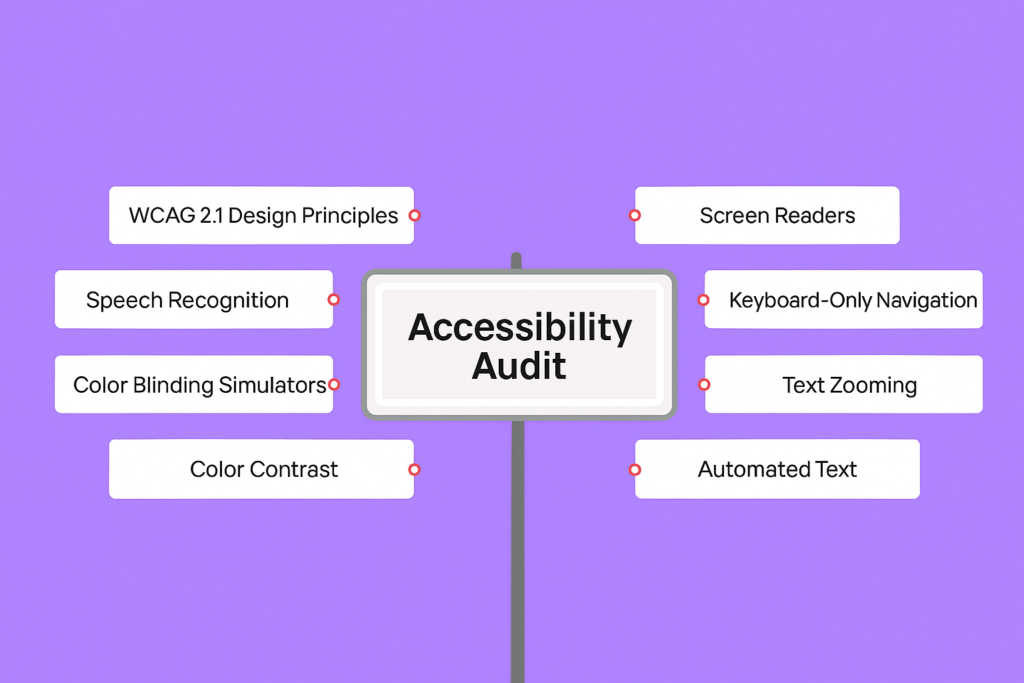
Accessible design in SaaS UI/UX Design enhances usability for all users while promoting inclusivity and meeting global accessibility standards. By incorporating elements like keyboard navigation, sufficient color contrast, and compatibility with assistive technologies, you create a SaaS experience that is intuitive, equitable, and user-friendly for a diverse audience.
To create an Accessible SaaS UX design, follow the Accessibility Audit checklist below:
- Accessibility of Text: Evaluate the readability and clarity of all text elements — including font size, color contrast, semantic HTML, and plain language — to ensure users can easily read and understand the content.
- Accessibility of Images, Audio, and Video: Ensure that non-text content is inclusive by adding descriptive alt text for images, transcripts or captions for audio, and subtitles or audio descriptions for videos.
- Accessibility of Interactive Content and Transactions: In SaaS UI/UX Design, accessibility testing should cover every interactive element—from buttons and forms to menus and navigation flows. Ensure each component has proper labels, clear and descriptive error messages, smooth keyboard navigation, and visible focus indicators. This not only improves usability for users with disabilities but also enhances the overall experience and compliance with accessibility standards.
- Accessibility of Technology: Verify that the underlying technology supports assistive tools and includes features for error prevention and easy recovery, helping users complete tasks without barriers.
7. Scalability
Scalability is the ability of a SaaS product’s design and architecture to evolve as the business and user base grow. A scalable interface is built with flexibility in mind, supporting new features, larger datasets, and more complex workflows without needing a full redesign.
This principle in SaaS UI/UX Design focuses on building modular systems, reusable components, and flexible layouts that can scale effortlessly as the product grows. However, true scalability goes beyond adding features—it ensures that every new element integrates seamlessly without disrupting usability. A well-scaled SaaS interface should remain intuitive, cohesive, and efficient, no matter how complex the platform becomes.
To create a scalable SaaS product design on demand:
- Build Modular UI Components & Design System: Design your product with growth in mind by creating reusable UI components that can easily adapt as new features are added. A strong design system ensures visual consistency, speeds up development, and allows teams to scale without sacrificing quality. This modular approach helps your product evolve smoothly instead of requiring major redesigns later.
- Plan for Expansion with Smart Architecture: Structure both the front-end and back-end to handle increasing users, data, and complexity. Organize navigation, information hierarchy, and workflows so they can expand logically as your product grows. A well-architected system supports new features seamlessly without confusing users or slowing performance.
- Test and Iterate: Regularly gather user feedback and run usability tests to spot friction points early. Track performance and engagement metrics to ensure scalability doesn’t compromise experience. Iterating based on insights helps the product stay efficient, adaptable, and aligned with evolving user needs.
Final thought
Mastering the core principles of effective SaaS UI/UX Design is about finding the right balance between functionality, simplicity, and user satisfaction. A truly successful SaaS product doesn’t just look modern—it feels natural to use, adapts to user needs, and evolves with time. By focusing on user-centric design, consistency, accessibility, and scalability, you can create experiences that not only meet business goals but also earn long-term user trust and loyalty. In the end, great SaaS UI/UX Design transforms complex systems into intuitive solutions that empower users and drive sustainable growth.
Frequently Asked Questions (FAQs)
1. What Makes SaaS Product Design Unique?
Product design for SaaS platforms requires a careful balance of scalability, usability, and flexibility to meet the needs of diverse users and devices. Unlike traditional software, SaaS applications operate in the cloud and serve multiple customers simultaneously—each with distinct workflows and objectives. This makes clarity, modularity, and efficiency essential elements of successful SaaS UI/UX Design. The interface should guide users effortlessly through their tasks, while the underlying design system must enable continuous updates and improvements without interrupting the overall user experience.
2. What are Common SaaS Design Mistakes to Avoid?
One of the most common mistakes in SaaS UI/UX Design is overcomplicating the user experience. Many teams add too many features too quickly, resulting in cluttered interfaces and user confusion. Another major issue is neglecting onboarding—expecting users to “figure it out” often leads to frustration and increased churn. Additionally, overlooking responsive design, accessibility, and performance can severely impact usability and trust, especially in B2B SaaS environments where reliability and clarity are critical.
3. What are the Best Practices for designing B2B SaaS platforms?
Designing B2B SaaS platforms demands a strong understanding of complex workflows, collaboration, and multi-user environments. Effective SaaS UI/UX Design begins with thorough user research to identify real challenges and map out journeys for different roles—since each stakeholder may engage with the platform differently. Prioritize a clear information hierarchy and intuitive navigation to help users accomplish tasks efficiently. Leverage data visualization to transform large datasets into meaningful, actionable insights. Finally, ensure scalability is embedded in your design system from the start so your SaaS product can evolve seamlessly as your clients’ businesses expand.